
Photos as a hint
On this page
In practically every command, it is possible to upload a graphic hint to the task. This option allows you to guide the user on how to execute a given command or how an item should look during control.
Uploading a graphic hint is possible in the Photos command section as a hint. Configuration of this section is not obligatory.
To upload a photo as a hint to the task, you can drag the photo file into the middle of the hatched rectangle or click on the rectangle and in the window that appears, select the file from your computer.
View of the command window after uploading the photos:
-
With one photo uploaded as a hint
-
With multiple pictures uploaded as a hint
View of the Take Photo command with photos as a hint in the mobile app:
- With one photo as a hint
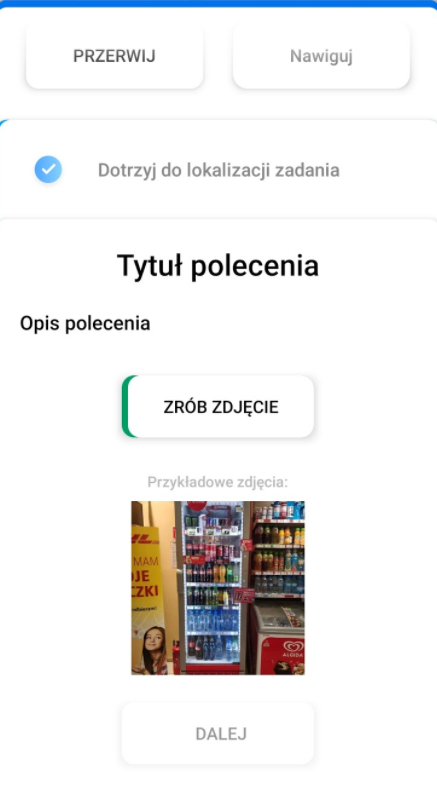
- With multiple photos as a hint Please Note: If you upload a large number of photos that do not fit on one screen, they will appear as a carousel. To view more photos, the user must scroll the visible ones to the left.
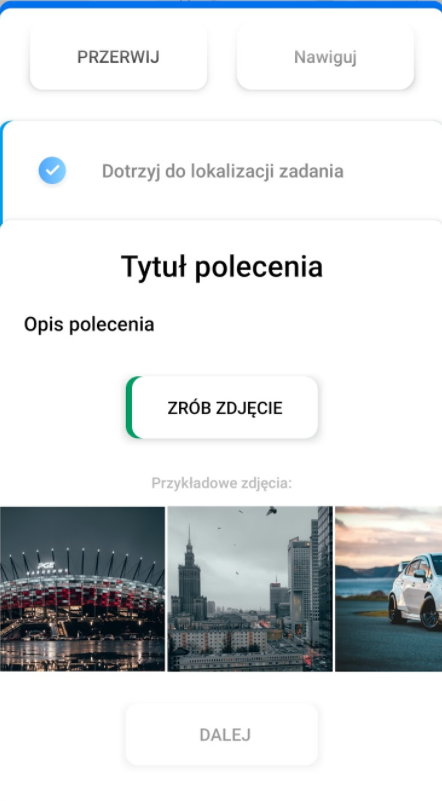
Image requirements
In order to make sure that the photos as a hint load efficiently, do not consume a lot of phone memory and transmission data, we recommend that the photos have the following properties:
- Resolution of the photo
Rectangular picture - 600x900 pixels
Square picture - 400x400 pixels
Maximum - 1200 pixels width and/or height
- Photo file size
Maximum - 500 KB
Recommended - 150 KB