
Periodic data deletion
The platform can automatically delete collected data after a specified time. This functionality covers, among other things, task configurations and the answers given. The function is controlled by two parameters, the task retention period and the answer retention period, which the user can set when creating/editing a task in the tab: General settings –> Advanced settings.
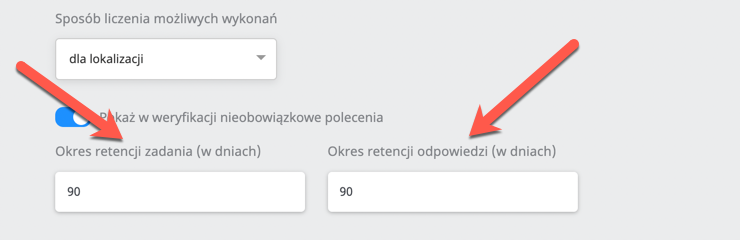
Task retention period (in days) - how long the task configuration is kept from the task’s end date.
In its advanced settings, every task has a configurable time for keeping the task configuration from its end date. By default it is 90 days. This means that when a task has ended, we check whether the task’s end date (we take the oldest date from the LGS into account) is older than 90 days, and such a task (with its process) is permanently deleted (together with all its LGSs).
Practical example: When a task goes to the “Completed” section and the parameter is set to e.g. 1, the task older than 1 day will be deleted.
The parameters responsible for cleaning up data for the task configuration retention time from the task’s end date are:
EnableTaskDetailsCleanUpJob- enables the job responsible for cleaning up tasksMaxEnqueuedCleanTaskDetailsJobs- the maximum number of tasks handled in the task cleanup jobRemoveTasksHours- hours entered separated by commas, 3 by default
Practical example: If the parameter is set to 50 tasks and 100 tasks already meet the data cleanup condition, then at night, when the job runs, it will pick 50 of them, and the other 50 the following night.
**Answer retention period (in days) -**how long the answers given are kept (Task Executions - regardless of status - Task: Active, Pending or Completed)
In its advanced settings, every task has a configurable time for keeping the answers given. By default it is 90 days, which means that all answers given*older than 91 days are permanently deleted.
*Answers given means: answers stored in the database and the generated photo files, except for photos**used as hints for tasks.
The parameters responsible for cleaning up task data:
EnableAgentTaskCleanUpJob- enables the job responsible for cleaning up AgentTask**
**(AgentTask = an execution in a task)
MaxEnqueuedCleanAgentTaskJobs- the maximum number of tasks handled in the AgentTask cleanup job
Practical example: there are 500 tasks and 400 of them require data cleanup, so if this parameter is set to 70, then after the data cleanup job runs, only 70 will be handled at night, another 70 the next night, and so on.
MaxAgentTaskCleanedPerJob- the maximum number of AgentTasks per task in the AgentTask cleanup job
Practical example: if this parameter is set to 20 and there are 5 tasks that require cleanup and have 40 executions each, then 20 executions will be deleted from each task, and the next 20 the following night.
RemoveAgentTaskToDateCommandAnswerBatchSize- the batch*** size when processing AgentTasks in the AgentTask cleanup job
***Batch=series
Practical example: This parameter says how many answers can be deleted from the database at once. If we have 10k answers that require cleanup, the parameter will not delete them in one go, but will split them into several batches/series.
RemoveAgentTaskToDateBatchSize- the batch*** size when processing AgentTasks in the AgentTask cleanup jobRemoveAgentTasksCommandTimeout- the timeout of a single command when deleting agentTasks
Note! When answers are deleted, the task’s counters (completed, for verification) change.
Practical example: there were 5 executions, the answers were deleted, and then the counters are reset to zero.