
Ad-hoc tasks
Business scenario:
Task A, performed by a manager (PartentAdHocTask).
Task B, performed by a subordinate user (AdhocTask).
The link between Task A and B is made in the application configuration by specifying the ID of the ParentAdhocTask task and the ID of the AdhocTask task; there can be many such pairs. [example below in Configuration to complete]
Manager’s task (PartentAdHocTask):
Task description:
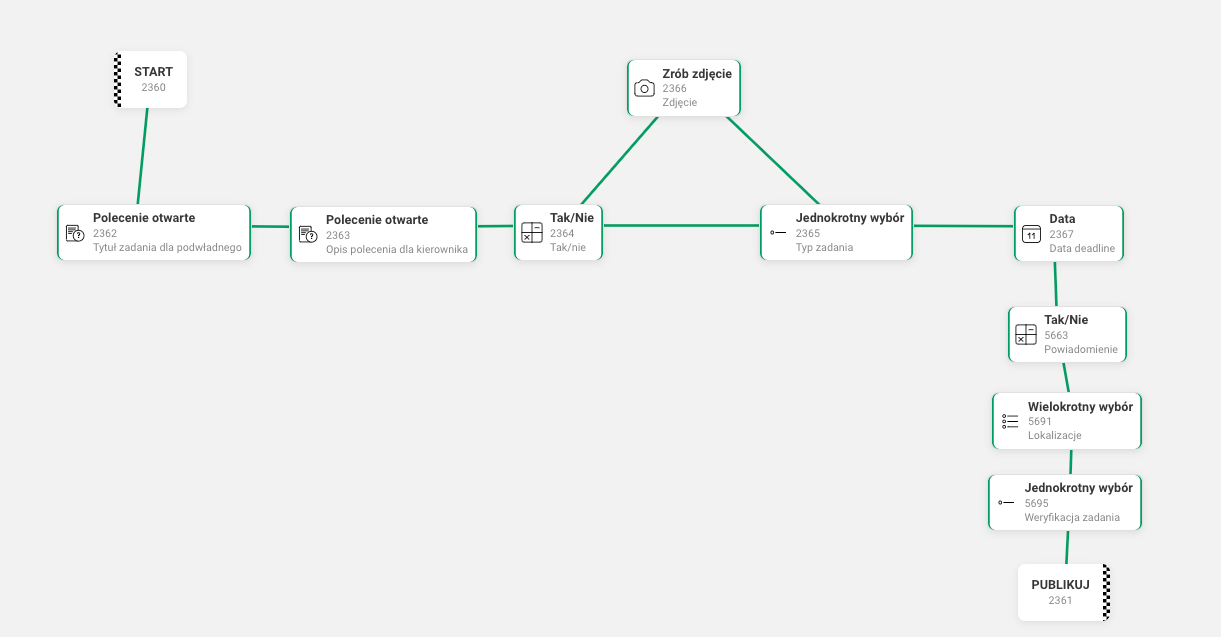
1. Open Question command - where the manager enters the Title of the ad-hoc task (for the Start button in task B and the first command in task B - inserted in the generator in task B) - mandatory
2. Open Question command - where the manager describes what needs to be done (description of the first command in task B - inserted in the generator in task B)
3. Take Photo - an option after a Yes/No decision - the manager takes a photo, which is a hint for the task description (the info is in the generator, task B)
4. Single Selection - the manager selects the task priority (this defines the type of task B) - mandatory
-
One-time
-
Priority
-
Informational
5. Execution date - the manager specifies by when the task must be performed (this is the deadline date and end of the task in task B) - mandatory
6. Creating a notification - the manager specifies whether the created task should include a notification that will be sent to their subordinates - optional
Yes/No command Selecting the answer Yes sets up the notification Selecting the answer No results in no notification in the new task
The notification has the following configuration:
Notification name: Ad-hoc notification Reason: Task not performed Frequency: One-time Date and time: {Set to “5 minutes” after the task start; the aim is for the notification to go out “right away” once the task is created” Type: Push, user performing the task Content: New Ad-hoc task: {Name of the start command task}
7. Location selection - the manager specifies in which locations the task should be visible. The available locations are taken from the Access to locations section in the user profile. In the generator, this function corresponds to a Multiple Choice command with no answers set; they are matched dynamically to the user each time the task is performed. - optional
8. Requires acceptance - the manager specifies whether the created task should require verification. If this option has been added, depending on the answer selected, the new task will get the Does it require acceptance? setting set to “Requires verification” or “Without acceptance” - optional
In the Single Selection command responsible for this setting, the answer labels are:
- Task to be verified
- Task without verification
The manager performs this task to point out some errors / give a subordinate something to do in the location. The task is directed to the location in which the manager performed their commissioning task (so the location group should be narrowed down, as we do with a csv file). The manager’s execution of the task launches a queued job that clones task B (task B exists as a pattern). The answers given by the manager in the task are carried over as reusable answers to the task cloned from the pattern. Each further answer the manager gives to the task carries the reusable answers over to the next cloned task - the manager can perform their task many times to commission many tasks.
Subordinate’s task:
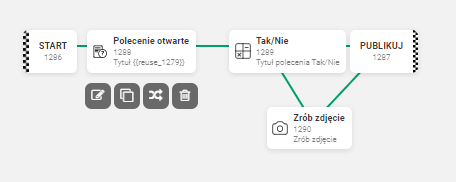
Task B has 1 in all counters. The start date is the date the manager’s task A was performed, the end date is always 01.01.2100 and the deadline date is the date specified in the manager’s task in the Date command. A Single Selection indicates whether the task is normal or priority. Another Single Selection indicates the user to be added to the cloned Adhoc task. The cloned task is added to the project, the same one as the task B pattern (for the new GUI).
In the ad-hoc task pattern, we do not need cycle support. In the ad-hoc task pattern we set whether the task clones should go to evaluation or not; by default they do (the manager will then be able to evaluate the task in mobile - the Mother module).
Configuration to complete:
CloneTaskPatternInputTypeSegmentCommandTypes - specifies the command types in which we will have sections with selectable field types for the cloned task (task name, task type, task deadline date) - by default these will be 3 types (2,8,20)
AdhocTaskPairsStringObjects - specifies the task pairs for creating conditional tasks (parent, child - pattern) - {“1150”:“1151”,“1152”:“1153”,“1154”:“1155”}
EnableCloneTasksJob - enables / disables the job that clones ad-hoc tasks (regular tasks can also be cloned, but for now I have left it as it was)
CloneTaskCancellationMinutesSuspended - the time after which any tasks still “being cloned” will be cancelled
NumberConcurrentClonedTasks - the number of tasks cloned “at once”